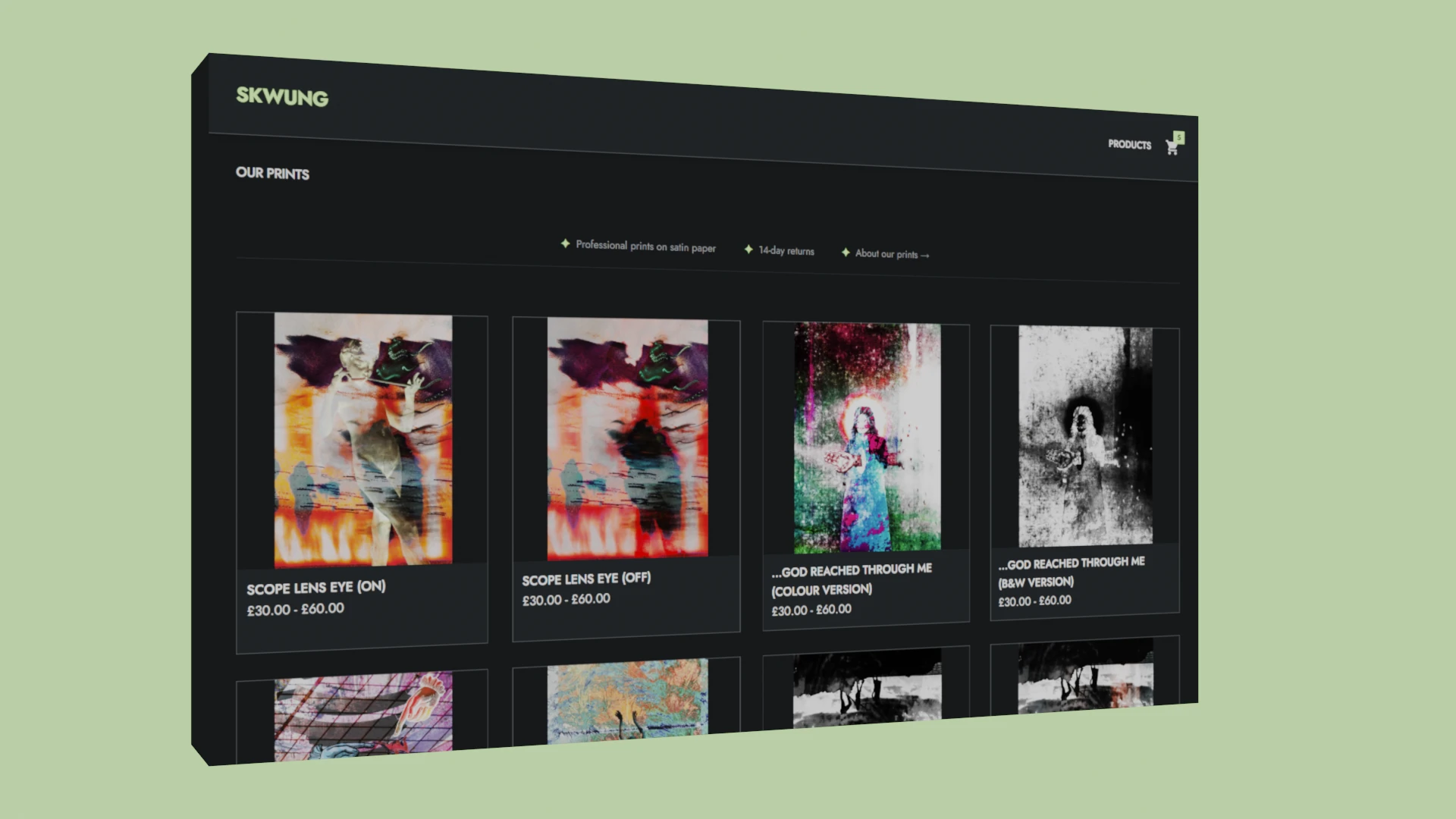
When it comes to selling art online, the common advice is to "just open an Etsy shop" or "spend a weekend on Shopify." But for many artists, those platforms feel less like a tool and more like a second job, one that comes with high fees, complex dashboards, and constant friction.
Technology should match the artist, not the other way around. Here is how we built a custom eCommerce experience on Skwung.com for a local artist.
Overview: The Artist and the Goal
Daisy, a talented artist local to Manchester UK, wanted a way to sell her premium-quality physical prints without the overhead of a massive platform. She already had a trusted local printing partner, she just lacked a digital storefront that felt as clean and intentional as her artwork.
We made her an offer: we’ll build you a full custom eCommerce site and handle all the development and hosting for you. No customer accounts to manage, no dashboards full of features you’ll never use, and no "renting" a storefront from a giant platform. Just a reliable way for your customers to buy your artwork.
5/5 Stars
“Webtree built a webstore that feels like a natural extension of my brand. It’s refreshingly simple to use, being able to manage everything from my phone while out and about is a game-changer. The team is almost too responsive... Any time I have a new idea or request it’s practically live on the site before I know it!”
- Daisy, artist and owner at Skwung.com
The Challenge: Selling Art Without Friction
The first mistake many agencies make is starting with a list of features. We started with Daisy’s reality:
- Physical focus: She sells high-quality physical prints, not digital downloads.
- Minimalist needs: She didn't want to spend weeks learning a "no-code" builder.
- Platform fatigue: She didn’t want "bloat" from expensive platform subscriptions.
Success Criteria
Before we wrote a single line of code, we defined what "success" looked like for this project:
Objective |
Success Metric |
|---|---|
Buyer Friction |
Customers can purchase in seconds without creating an account. |
Trust |
The checkout must feel familiar, secure, and professional (Stripe). |
Efficiency |
Admin tasks (adding art, checking orders) must be fast. |
Versatility |
The system must work perfectly at a gallery or market, not just online. |
Sustainability |
Zero unnecessary functionality to clutter the workflow. |
Revenue generating |
Revenues are paid out daily to the seller’s bank account. |
The Solution: A Minimalist eCommerce System
We didn't build a "platform", we built a flow. User experience for the seller and customer is our first priority in our design.
The Order Journey
By removing the requirement for customer accounts, we removed the #1 reason for cart abandonment. The backend is quite streamlined: when a payment completes, a webhook triggers an automatic order creation. The seller receives an order confirmation promptly, the customer gets their receipt, and the art moves to the shipping phase automatically.
The Customer Journey
- Browse: View high-resolution artwork in a clean, minimalist gallery.

- Select: Choose a print size (standardised for easy shipping).

- Details: Enter name, email, and shipping address.

- Pay: Secure, one-click checkout via Stripe.

- Confirm: Instant confirmation on-site and via email.

Admin Experience: Tools for Humans
Instead of a "powerful CMS" (which is usually code for "confusing"), Daisy has an admin toolkit designed for the specific jobs she needs to do:
- Managing Orders: A filtered view of what needs to be shipped, allowing her to update statuses in two clicks.
- Managing Products: A bulk product importer that respects her time. Adding 10 new pieces of art takes a couple of minutes, not hours.
- Managing People: The ability to add team members as admins so she doesn't have to share private passwords, keeping her business secure as she grows.

In-Person Sales: The "Big Green Tick"
Artists don't just sell online. They sell at galleries, pop-up markets, and studios. Traditionally, processing a card payment in person meant carrying a bulky card reader or telling the customer to “visit the website later” (which they rarely do).
Our POS Storefront feature changes that.
When Daisy is at an event, she can access her admin panel, build a cart for a customer, and generate a unique QR code.

The customer scans it with their phone, pays via Stripe, and a big green tick appears on Daisy's device. That green tick is the moment of truth. It’s the instant confirmation that the money is safe, the order is logged, and she can hand over the product with total confidence of being paid.

Automatic product marketing for your customers
When someone buys from Daisy they’re added to the mailing list and automatically informed of new drops in the store to help encourage return custom.

Our Approach: Tailoring over Customisation
This project represents the Webtree Services philosophy. We don’t build generic storefronts, and we don’t force you to use expensive, "one-size-fits-all" features. And we ensure all your site functionality is tested and maintained, in addition to offering seamless updates when you need them.
We build systems that match your real business needs. By providing only what you need, we keep your costs low and your workflow fast. Enquire now for a free consultation.